
CES survey software
Reduce customer effort. Increase loyalty.
Customer Effort Score (CES) measures how easily customers get their questions answered or issues resolved. CES surveys are built into Boast, giving you visibility into your customer support engine.
Free for 14 days · No credit card · Set up in minutes
What is CES?
Measure the effort, then remove it
When you measure customer effort, you can systematically improve customer experiences. Customer Effort Score (CES) is a metric for understanding the amount of effort it takes customers to solve a problem or get an answer to a question. Customer effort is directly related to customer loyalty, so reducing it can have a big impact on your bottom line by reducing churn, increasing referrals and ultimately boosting revenue.
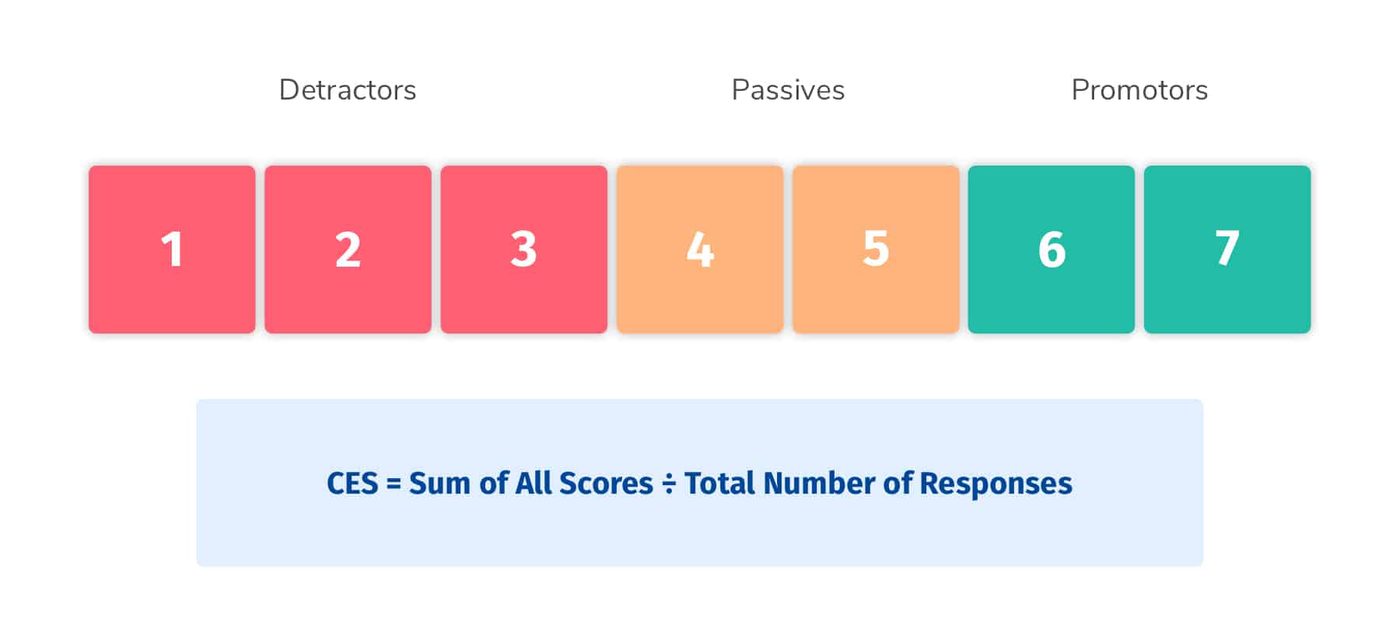
The CES survey. You may want to customize the survey to the type of interaction a customer had, but the standard starting point is “How easy was it to handle your issue?” Customer Effort Score is typically measured on a scale of 1 to 7, with 1 being “very difficult” and 7 being “very easy.” Collect the rating, then prompt customers to explain why they gave it.
Calculating CES. After surveying your customers, your CES is the average of all responses, giving you a score from 1 to 7.
Benefits
How businesses benefit from CES surveys
Reduce negative reviews
Hear from customers who struggled while the issue is still private. Fix it, follow up, and turn a frustrated customer into a loyal one before they post.
Predict future purchases
CES has been shown to predict whether a customer will buy from you again, giving you insight into retention, churn and potential referral business.
Reduce support tickets
CES surveys show where customers get stuck when solving problems. Improve your documentation and cut the number of support requests you receive.
Track trends over time
Because CES is a single question and a single metric, it's easy to identify changes over time and make business improvements as needed.
Improve customer loyalty
When you know the struggles and complaints customers have, you can solve them faster and keep future customers from the same experience, fueling loyalty.
Grow your business
Happy customers mean repeat purchases and referrals. CES surveys show you how to make customers happier and ultimately grow your business.
The plan
Three steps to CES surveys that send themselves
Boast integrates with your existing tools, so survey requests go out at the right time and you collect valuable data without even thinking about it.
- 1
Ask
Pick one of 18 proven templates, then send the request by email or SMS, share a link, or embed the form on your site. Boast follows up so you don't have to.
See how requests work - 2
Record
Customers tap the link and record from any phone or laptop. No app, no login. Guided prompts tell them what to talk about, so nobody freezes on camera.
Meet Guided Prompts - 3
Share
Approve with one click. Captions are burned in automatically and the testimonial appears on your website, social channels and ads.
Explore display widgets
Why Boast for CES
Low effort for your customers. Clear answers for your support team.
- Easy for customers: mobile-friendly surveys with no login, sent by email or SMS
- Fits your process: trigger the survey when a ticket closes through Zapier, then set requests on autopilot with Sequences
- Robust reporting: identify customers at risk of churning and track CES over time per customer or across the organization
- One feedback platform: CES plus NPS, CSAT, custom surveys and video testimonials

Video answers New
When support nails it, let the customer say so on camera.
- Conditional logic shows the video question only after a high rating
- Guided Prompts tell customers exactly what to talk about
- Captions added automatically, ready for your site and socials
What it costs to wait
Every customer who struggles to get help is quietly deciding whether to stay.
- Effort you can't see
Customers who gave up halfway through a help article don't file a ticket. They churn. CES shows you where they got stuck.
- Tickets that keep coming
Without knowing where customers struggle, your team answers the same question again and again instead of fixing the cause.
- Loyalty leaking away
Customer effort is directly related to loyalty. Every hard interaction makes the next renewal a little less likely.
- Great support nobody hears about
When your team resolves an issue brilliantly, that story deserves to be a testimonial, not just a closed ticket.
FAQ